Helium 10 Complete Guide: Free Tools, Pricing, and How to Use It Like a Pro

Helium 10 is a professional suite of tools created to empower Amazon and Walmart sellers with accurate product, keyword, and market data. It has become a go-to platform for thousands of eCommerce entrepreneurs seeking to scale their businesses with real-time analytics, product validation, and listing optimization.
In this guide by Navodaya SEO, we’ll walk you through everything about Helium 10 — including its free tools, pricing, features, and hands-on tutorials for effective product and keyword research.
Table of Contents
- 1. What Is Helium 10?
- 2. Is Helium 10 Free?
- 3. Helium 10 Free Trial 2025
- 4. How to Use Helium 10 for Free
- 5. Product Research with Helium 10
- 6. Keyword Research Using Helium 10
- 7. What Is CPR in Helium 10?
- 8. Where Does Helium 10 Get Its Data?
- 9. How to Install Helium 10 Chrome Extension
- 10. Canceling Your Helium 10 Subscription
- 11. Troubleshooting: Helium 10 Not Working
- 12. Helium 10 Pricing Plans (2025)
- 13. Helium 10 vs Jungle Scout
- 14. Frequently Asked Questions
1. What Is Helium 10?
Helium 10 is a comprehensive SaaS platform that helps Amazon sellers research profitable niches, optimize listings, track performance, and manage operations — all from one dashboard.
- Product Research: Identify high-demand, low-competition items.
- Keyword Research: Find top-ranking search terms on Amazon.
- Listing Optimization: Optimize titles, bullet points, and descriptions.
- Profit Tracking: Analyze ROI, fees, and overall profitability.
Helium 10 simplifies Amazon selling by giving data-driven insights for every stage — from product discovery to scaling.
2. Is Helium 10 Free?
Yes, Helium 10 offers a Free Plan that gives you limited but valuable access to its tools. This is ideal for beginners who want to explore the ecosystem before upgrading.
Free Tools You Can Access:
- Black Box: Limited product searches per day.
- Cerebro & Magnet: Keyword research tools with basic limits.
- Xray (Chrome Extension): Full functionality for product analysis.
- Freedom Ticket: Free access to Amazon FBA training resources.
3. Helium 10 Free Trial
Helium 10 often provides a free trial or discount coupon for new users. For 2025, most accounts get access to limited-time premium features when registering with a verified email.
Pro Tip: Use coupon code HEL10SAVE10 to get up to 20% off for your first months.

4. How to Use Helium 10 for Free (Step-by-Step)
- Go to helium10.com and click Sign Up Free.
- Verify your email and complete onboarding.
- Install the Helium 10 Chrome Extension for instant Amazon data.
- Start using Black Box for product ideas and Cerebro for keyword insights.
- Explore Freedom Ticket training for practical Amazon strategies.
5. Product Research with Helium 10
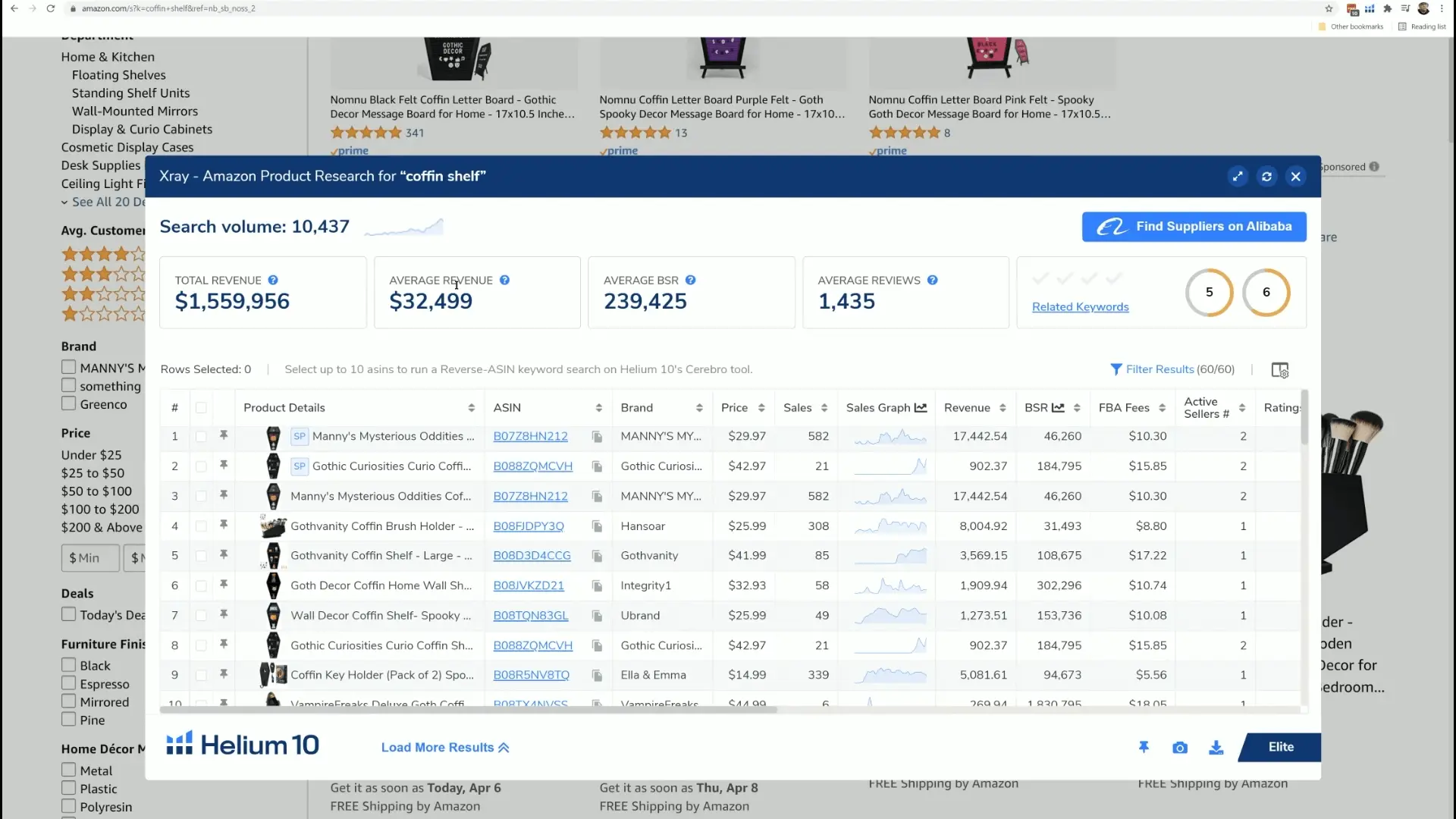
Helium 10’s Black Box is a powerful database for product discovery. It allows filtering by category, price range, sales volume, and competition levels.
Steps:
- Navigate to Black Box in your Helium 10 dashboard.
- Enter filters such as minimum sales, price range, and reviews.
- Click Search to reveal high-demand, low-competition products.
- Validate using Xray for real-time sales estimates.
Product validation helps ensure your investments are data-backed, not guesswork.
6. Keyword Research Using Helium 10
Keywords drive visibility on Amazon. Helium 10’s Cerebro and Magnet help you uncover terms customers actually use.
- Copy a competitor ASIN and paste it into Cerebro to analyze their keyword strategy.
- Use Magnet to find related long-tail keywords.
- Filter by search volume, competition, and relevancy.
- Export keyword lists for PPC campaigns or listing optimization.
For best results, combine Cerebro (competitive analysis) with Magnet (broad discovery).
7. What Is CPR in Helium 10?
CPR (Cerebro Product Rank) estimates how many units must be sold in a short timeframe (usually 8 days) to rank a product on page one for a given keyword. It’s a valuable indicator for launch planning and PPC strategy.
8. Where Does Helium 10 Get Its Data?
Helium 10 uses a combination of:
- Amazon’s public listing data
- Historical performance and ranking patterns
- Real-time keyword trend tracking
This ensures accuracy and consistency across product metrics.
9. How to Install Helium 10 Chrome Extension
- Visit the Chrome Web Store.
- Search for “Helium 10 Chrome Extension”.
- Click Add to Chrome → Confirm installation.
- Log into your Helium 10 account.
- Open Amazon, click the Helium 10 icon, and start analyzing listings.
10. Canceling Your Helium 10 Subscription
- Sign into your Helium 10 dashboard.
- Navigate to Settings → Billing.
- Click Cancel Plan and confirm the action.
- You retain access until your billing period ends.
11. Troubleshooting: Helium 10 Not Working
If Helium 10 is not functioning properly:
- Clear browser cache and cookies.
- Update your Chrome extension.
- Ensure login credentials are correct.
- Disable conflicting browser plugins.
- Check Helium 10 Status Page for outages.
12. Helium 10 Pricing Plans
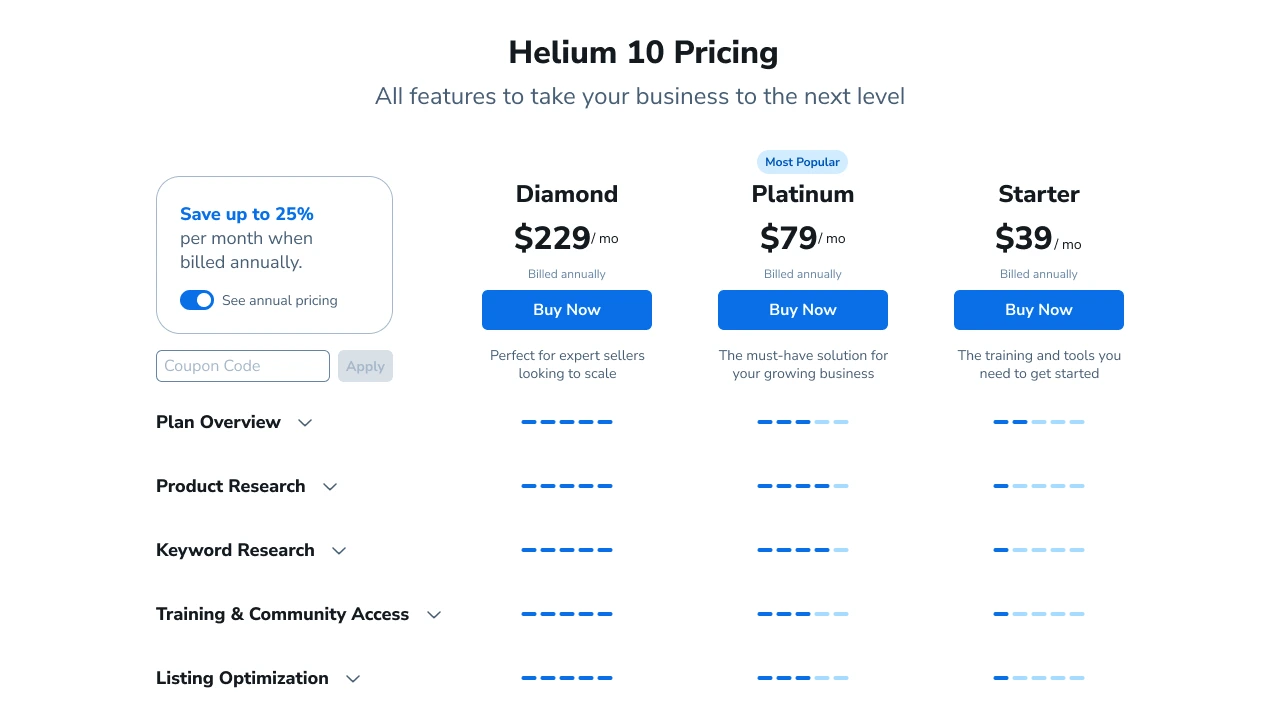
| Plan | Price/Month | Best For |
|---|---|---|
| Free | $0 | Beginners |
| Starter | $39 | New Sellers |
| Platinum | $99 | Active Amazon Businesses |
| Diamond | $279 | Advanced Sellers & Agencies |
Each tier adds more searches, automation, and deeper analytics capabilities.
13. Helium 10 vs Jungle Scout
| Feature | Helium 10 | Jungle Scout |
|---|---|---|
| Free Plan | Yes | No |
| Keyword Tools | omprehensive | imited |
| Listing Optimization | Built-In | Available |
| PPC Analytics | Advanced | Basic |
Helium 10 offers a broader toolset and free accessibility, making it the stronger all-in-one option for data-driven Amazon sellers.

14. Frequently Asked Questions
Is Helium 10 free to use?
Yes, Helium 10 provides a free plan that allows limited access to tools such as Black Box, Cerebro, and Magnet.
Does Helium 10 have a free trial?
Yes, Helium 10 frequently offers trial periods or discount codes for new users, especially in 2025 promotions.
How do I cancel my Helium 10 plan?
Go to Settings → Billing → Cancel Plan. Your account remains active until the current billing cycle ends.
Where does Helium 10 get its data?
Helium 10 collects and processes Amazon marketplace data, including public listings, search trends, and historical performance patterns.
Conclusion
Helium 10 continues to lead the Amazon FBA analytics industry in 2025, empowering sellers to identify profitable products, optimize listings, and automate key operations. Whether you’re testing the free plan or managing multiple stores with the Diamond tier, Helium 10 provides a complete toolkit to stay competitive in eCommerce.
Start exploring Helium 10 today and make smarter business decisions with data, not guesswork.